Online Stopwatch
A clean, free stopwatch with lap times. Press Start (or the spacebar) to begin.
Full stopwatch instructions
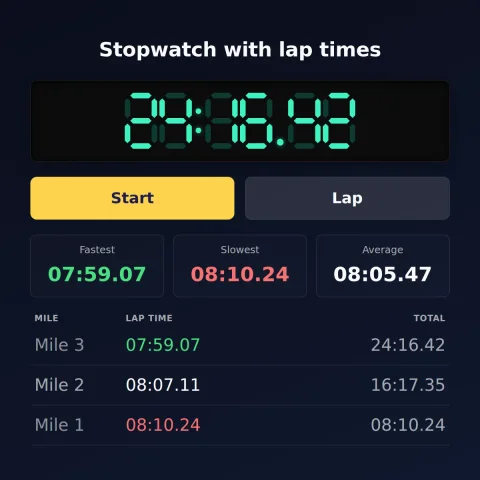
Start begins the clock and Stop pauses it. Tap Lap to record a split without stopping — each lap shows its own time and the running total, newest first. With two or more laps the fastest is marked green and the slowest red, and the +/- column compares each lap with the one before it. Reset clears everything.
Once you have a lap, Copy puts the list on your clipboard, Download saves it as a CSV for Excel, Google Sheets or Numbers, and Share renders the session as an image. Those three stay greyed until there is a lap to act on.
The gear icon beside the display holds three settings, remembered on your device: a start delay (3, 5 or 10 seconds, to get into position), the display precision (hundredths, milliseconds or seconds only — seconds is the one to pick for a projector), and what to call the laps (Lap, Mile, Set, Round, Rep, Interval, Split or Speaker), which renames them in the list and in the export.
The arrows button fills the screen. On a computer, Pop out opens the stopwatch in a small window that floats above your other apps — drag its edge to resize and the digits follow.
Keyboard: Space start/stop · L lap · R reset · F full screen.
What it is, and how far to trust it
A stopwatch that runs entirely in your browser and counts to the hundredth of a second. Nothing to install, no account, and it keeps working on a phone with the screen on and no signal. What every button does is under Full stopwatch instructions, just above.
Your session is saved on your device. A running stopwatch keeps counting and your laps are still there if you refresh the page, close the tab or come back tomorrow — it measures the wall-clock time since you pressed Start, so the gap counts. Reset is what clears it.
Displayed precision depends on your device and browser, so this isn't suitable for official sports timing, scientific measurement, medical use, or anything needing calibrated equipment. The display can also update less often in a background tab — see browser timing limitations, or how accurate is a browser timer? for the measured figures.
Lap time vs. split time
People use "lap" and "split" in slightly different ways, so here's how this stopwatch means them. A lap time is how long one segment took — the time since your last tap of Lap. The total (sometimes called the cumulative split) is the running time since you pressed Start. Tap Lap at the end of each rep, length or checkpoint and you'll build a list of individual lap times alongside the total, so you can compare segment to segment or read off the elapsed time at any checkpoint.
Ways to use an online stopwatch
- Running & track intervals: lap each 400 m or rep and compare splits — the fastest/slowest highlight shows which one you nailed or faded on.
- HIIT, Tabata & circuits: time work and rest rounds, then download the CSV to log the session.
- Classroom & teaching: time experiments, reading fluency, timed tests or transitions — big, clear digits across the room.
- Science & labs: record repeated trials as laps and export them for your results table.
- Cooking: time a rest, a sear or a pour without hunting for a kitchen timer.
- Speed & skill practice: typing tests, reading speed, speedcubing, presentations and public-speaking run-throughs.
Need to count down to a set length of time instead? Use the online timer. Counting down to a date or event? Make a countdown.
Teaching with it? The classroom timer & stopwatch guide covers full screen on a projector, keyboard shortcuts, timing reading fluency with laps, and sharing a session as a spreadsheet or an image.
Timing more than one thing? Run up to four stopwatches at once — one per lane, group or station, each with its own name and laps.
Wondering how precise it really is? How accurate is a browser timer? has the measured numbers.
Stopwatch FAQ
Is the online stopwatch free? Yes — completely free, with no sign-up and no app to install. It works on any phone, tablet or computer with a browser.
What's the difference between a lap and a split time? A lap time is how long one segment took (since your last Lap tap); the total is the running time since you started. Each Lap records both.
Does it show my fastest and slowest laps? Yes — with two or more laps, the quickest is highlighted green and the slowest red, and your fastest, slowest and average lap are shown above the list.
Can I download or copy my lap times? Yes — Download CSV saves a spreadsheet file that opens in Excel, Google Sheets or Numbers, and Copy puts the laps on your clipboard. Both include the lap time, the +/- against the previous lap, and the running total.
Can I change how precise the display is? Yes — the gear icon offers hundredths (the default), milliseconds, or seconds only. Milliseconds is offered because a foreground tab keeps its timer within about a millisecond of schedule, so the third digit is real; seconds-only is there for a projector, where a flickering hundredths column across a room is just noise.
Will it keep timing if I refresh or close the tab? Yes — your session is saved on your device, so a running stopwatch keeps counting and your laps are still there when you return. Reset clears it.
How accurate is it? It times to a hundredth of a second, but the precision your device shows can vary and a background tab may update less often, so it's great for everyday use — not official sports, scientific or medical timing.
Can I control it with the keyboard? Yes — Space starts and stops, L records a lap, and R resets.